Suzhou Volsun Electronics Technology Co., Ltd.

Views: 0 Author: Site Editor Publish Time: 2026-02-13 Origin: Site


Overheating is one of the biggest threats to electronic components. Without proper heat dissipation, performance can degrade or even lead to failure. In this article, we will explore how to use a silicone thermal pad effectively. You’ll learn why these pads are crucial for maintaining optimal temperatures and how they can enhance the performance of your devices.
A silicone thermal pad is a thermal interface material (TIM) used to enhance heat transfer between heat-generating components and their heat dissipation devices, such as heat sinks. It consists of organic silicone rubber combined with high-performance thermal fillers. This combination makes the pads soft, flexible, and compressible, enabling them to efficiently fill small gaps between surfaces that need heat dissipation.
Unlike thermal pastes, which can be messy and difficult to apply, silicone thermal pads offer a cleaner and more convenient solution. They are pre-formed and ready for installation, making them a practical choice for a variety of electronic devices.
Thermal conductivity is a key property for materials used in heat dissipation. It measures how well a material can transfer heat. Silicone thermal pads typically have thermal conductivity ratings ranging from 1 to 8 W/(m·K), which allows them to efficiently move heat from electronic components to heat sinks.
Here’s how they help in heat dissipation:
● Thermal conductivity: The higher the value, the better the material performs in transferring heat.
● Gaps: By filling the tiny gaps between components and cooling surfaces, silicone pads ensure that heat is transferred more efficiently, preventing overheating.
Selecting the correct thickness of a silicone thermal pad is essential for efficient heat transfer. The pad must fill the gap between the heat-generating component and the heat sink without causing misalignment or excessive pressure.
● Too Thin: A thin pad might not provide adequate coverage, leading to poor heat transfer and possible overheating.
● Too Thick: A thick pad can prevent the heat sink from being properly mounted, resulting in pressure issues or misalignment.
Recommended Thickness:
Component Type | Recommended Thickness | Application |
CPUs and GPUs | 1.5mm to 2mm | Desktop PCs, laptops, gaming consoles |
Power Modules | 3mm to 5mm | High-power industrial machinery, automotive |
Thermal conductivity measures how efficiently a material transfers heat. The higher the conductivity, the more effectively heat can be moved from the component to the cooling system.
● Higher Conductivity: Ideal for high-performance components like gaming PCs and industrial machinery, where fast and efficient heat dissipation is critical.
● Lower Conductivity: Sufficient for components with lower power usage, such as home electronics and routers.
Silicone thermal pads typically range from 1 W/(m·K) to 8 W/(m·K). For high-performance applications, choose pads with higher thermal conductivity ratings (e.g., 5–8 W/(m·K)) to ensure efficient cooling.
When choosing a silicone thermal pad, keep these factors in mind to ensure optimal performance:
● Component Size: Measure the component's surface area to ensure the thermal pad covers it completely without leaving gaps.
● Power Usage: High-power components like CPUs, GPUs, and power modules generate more heat and require pads with higher conductivity.
● Temperature Range: Ensure that the thermal pad can handle the device's operating temperature. Suzhou Volsun’s thermal pads are designed to operate between -40°C and 200°C, making them suitable for a wide range of applications, including automotive and industrial machinery.
Before applying a silicone thermal pad, it’s critical to prepare both the component and the heat sink to ensure optimal thermal conductivity. Any dust, old thermal material, or oil can interfere with the pad’s ability to transfer heat effectively.
● Clean the Component: Use isopropyl alcohol (at least 70%) and a lint-free cloth to clean the component thoroughly. This includes the CPU, GPU, or any other part that generates heat.
● Clean the Heat Sink: Wipe down the surface of the heat sink or cooling surface using the same alcohol solution and cloth. Ensure that both surfaces are dry and free from contaminants before proceeding.
Proper cleaning ensures that the silicone pad adheres firmly and maximizes heat dissipation.
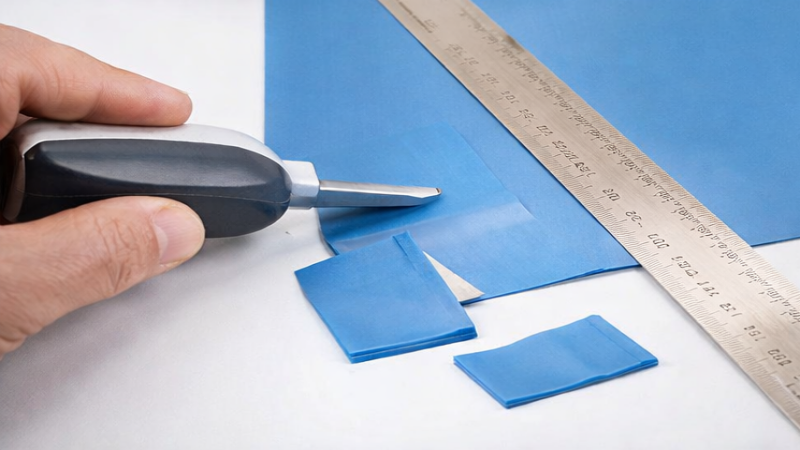
Once the surfaces are clean, you need to measure the required area and cut the thermal pad to fit. Proper sizing is essential for effective heat transfer.
1. Measure the Surface Area: Use a ruler or caliper to measure the gap between the component and the heat sink. The thermal pad should cover the entire surface without overlapping or leaving exposed areas.
2. Cut the Pad to Size: If the pad is not pre-cut, use scissors or a utility knife to cut the silicone thermal pad to the required dimensions. Ensure the edges are smooth to avoid air gaps during installation.
A properly sized thermal pad ensures maximum contact, which is essential for effective heat dissipation.
After cutting the silicone pad to the correct size, it’s time to position it correctly on the component.
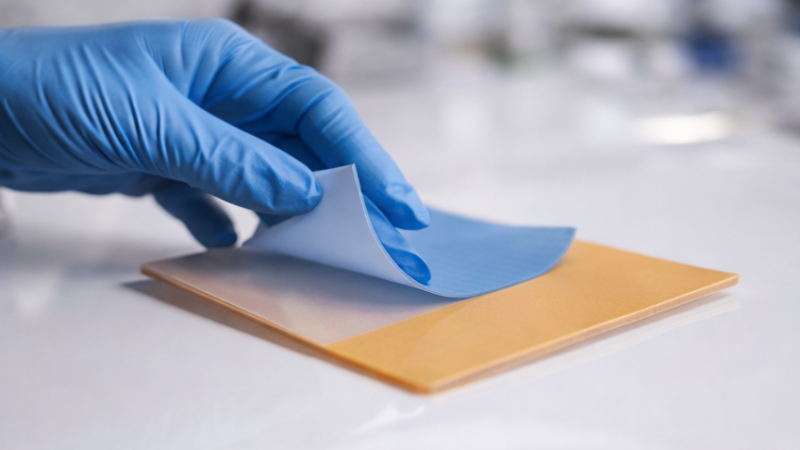
1. Remove Protective Films: Most thermal pads come with protective films on both sides. Start by removing one layer of the protective film.
2. Place the Pad: Align the exposed side of the pad with the component, making sure it covers the entire heat-generating surface. Press it gently to eliminate any air bubbles and ensure even contact.
3. Remove the Second Film: Once the pad is in place, carefully remove the second protective layer from the top side of the pad.
The goal is to ensure that the pad is in full contact with the component and that no air gaps remain.
Once the thermal pad is properly placed, it’s important to secure the heat sink or cooling component to ensure effective heat transfer.
● Position the Heat Sink: Carefully align the heat sink with the thermal pad. It should sit evenly on top of the pad to maximize contact and avoid any misalignment.
● Apply Even Pressure: Secure the heat sink by applying gentle, uniform pressure. Tighten the screws or clips carefully, ensuring the heat sink is firmly attached but not over-tightened, as this can damage the component or thermal pad.
Choosing between silicone thermal pads and thermal paste depends on your application needs. Here’s a comparison of the two:
Feature | Silicone Thermal Pads | Thermal Paste |
Ease of Application | Easy to apply, no special tools needed | Requires precision and careful spreading |
Mess-Free | No mess, easy handling | Can be messy, requires cleanup |
Thermal Conductivity | Lower conductivity (1–8 W/(m·K)) | Higher conductivity (4–12 W/(m·K)) |
Application Suitability | Ideal for general electronics and low to medium power devices | Best for high-performance CPUs, GPUs, and gaming systems |
Installation Time | Quick and simple | Time-consuming, requires precision |
Surface Compatibility | Good for even surfaces and moderate gaps | Excellent for uneven surfaces, fills tiny gaps |
Thermal paste is typically the better option when maximum thermal performance is required. It is especially useful in the following scenarios:
● High-Performance CPUs and GPUs: These components generate substantial heat and need superior thermal conductivity for optimal cooling.
● Gaming PCs and Workstations: For systems under heavy load, thermal paste offers better heat dissipation, helping prevent overheating.
● Tightly Packed Components: When components are packed closely together and have small gaps, thermal paste can effectively fill those spaces and ensure optimal cooling.
For general applications and beginner users, silicone thermal pads offer several key advantages:
● Ease of Installation: Silicone pads are simple to install and require no special tools or expertise, making them ideal for first-time builders or quick setups.
● Mess-Free: Since silicone pads are dry and pre-formed, they are much easier to handle and apply without creating a mess.
● Sufficient for Low to Mid-Power Applications: For everyday components like low-power CPUs or power modules, silicone thermal pads provide adequate heat dissipation without the need for high-performance thermal paste.
Silicone thermal pads are designed for long-lasting performance, but over time, they may degrade or lose effectiveness. It's important to monitor your thermal pad and replace it when necessary to ensure efficient heat transfer.
Common signs that indicate your silicone thermal pad needs replacement include:
● Decreased Cooling Efficiency: If your components are overheating or running at higher temperatures than usual, the thermal pad may have worn out, causing poor heat transfer.
● Visible Cracks or Damage: If the pad is physically cracked, torn, or has lost its elasticity, it is no longer effective.
● Compression or Flattening: Over time, thermal pads can compress and lose their thickness, resulting in reduced performance. If the pad appears significantly flattened, it should be replaced.
● Aging or Hardening: If the pad has hardened or shows signs of brittleness, it is no longer able to properly conform to the component’s surface, impacting heat dissipation.
To ensure your silicone thermal pad continues to perform well, consider the following maintenance tips:
● Monitor Component Temperatures: Regularly check the temperature of your components using software tools. If you notice an increase in temperature, it may indicate the thermal pad is no longer effective.
● Clean the Surfaces Periodically: Dust, dirt, or old thermal material can compromise the thermal pad’s effectiveness. Clean the component and heat sink regularly to maintain good contact between the surfaces.
● Ensure Proper Installation: When installing or reinstalling the thermal pad, ensure it is positioned correctly with even pressure. Misalignment or uneven contact can lead to ineffective heat transfer.
Proper maintenance helps extend the life of the thermal pad and ensures optimal heat dissipation, preventing potential overheating issues.
The lifespan of a silicone thermal pad can vary depending on usage and environmental conditions. However, it is generally recommended to replace the thermal pad every 1 to 2 years. Regular inspections will help determine when replacement is necessary.
When inspecting your thermal pad, look for the following:
● Physical Condition: Check for cracks, tears, or flattening. Any visible damage means the pad should be replaced.
● Compression: If the pad has been compressed significantly and no longer fills the gap effectively, it’s time for a replacement.
● Effectiveness: Monitor component temperatures over time. An increase in temperature, despite proper cooling, often signals that the thermal pad is no longer performing at its best.
Silicone thermal pads are easy to apply and offer effective heat dissipation. They help maintain optimal temperatures in electronic devices, preventing overheating and improving performance. Suzhou Volsun Electronics Technology Co., Ltd. provides high-quality silicone thermal pads, offering reliable solutions for various applications. Their products ensure consistent cooling, helping to prolong the lifespan of electronic components.
A: A silicone thermal pad is a heat transfer material used to dissipate heat between electronic components and heat sinks, ensuring optimal temperature management in industrial applications.
A: Select a silicone thermal pad based on factors such as thickness, thermal conductivity, and the component's temperature range. High-performance devices may require pads with higher conductivity ratings.
A: Silicone thermal pads require periodic inspection for wear or compression. Replace them every 1-2 years or when heat transfer efficiency decreases, ensuring reliable performance.
A: Yes, silicone thermal pads are durable and cost-effective over time, offering a longer lifespan than some thermal pastes. They are easy to install and maintain, making them ideal for long-term use in industrial settings.


